bubble witch saga pet rescue saga papa pear saga candy crush saga farm heros saga
Showing posts with label CHEATS. Show all posts

Precision SHOTS - for FREE!


Finding it hard reaching those tricky shots when playing Bubble Witch Saga?

Not Any More!
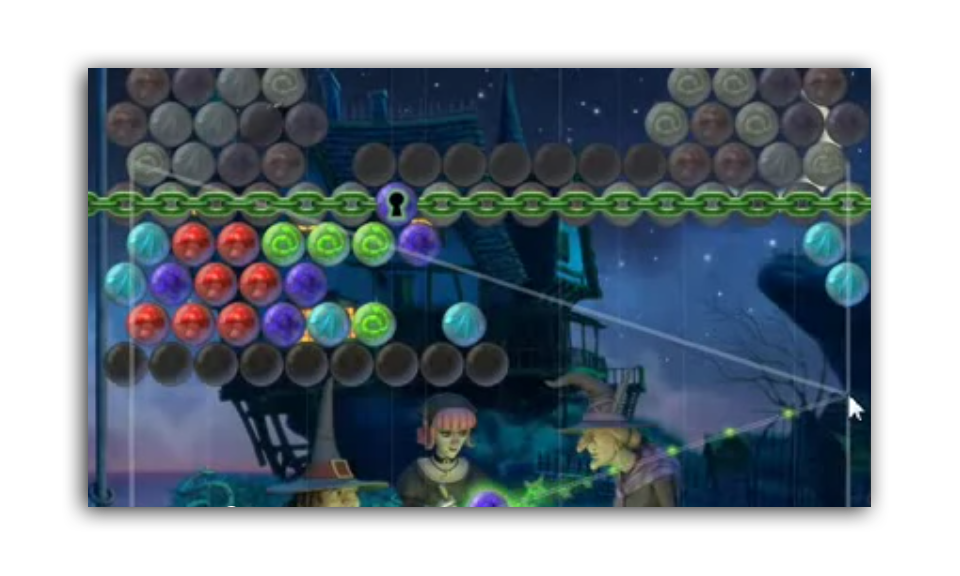
Playing Bubble Witch Saga has never been easier, but it doesn't end there, this tool may be used for 
ANY GAME THAT REQUIRES PRECISION SHOOTING


This amazing little FREE tool allows you to line up your shots at any angle.

So simple to use, all you do is hold down your SHIFT KEY to place the Starting Point and if you need your mouse to move more slowly, simply hold down the CNTRL KEY.

Are you ready to give it a try?
Just click this image and ZeScreenRuler will install on your computer.  

All you need to do is select RUN and away you go.

Here is a look at how you can set up your settings. 

The default key to TURN OFF and ON 
is your NUM LOCK Key 
but this can be changed in the settings.


Lets go through those settings again:

SHIFT KEY
Places your starting point.

CTRL KEY
Slows down your mouse.

NUM LOCK
Turns the Ruler OFF and ON.


Some describe this tool as a Cheat, I describe it as a "TOOL".
  You know why?  
  Because that is all it is.  

It won't play your game for you; it just makes it easier 
AND
 With this tool at your fingertips there is no need to Purchase expensive Charms or other Power Ups on any Games that require precision shooting.

Because this tool is on your computer, you can even use it with games that you don't play on line.  
The possibilities are endless!  


You are FREE to use this Tool at no cost, if you wish to donate to the developer, you can by clicking on the
PayPal Donate button below. 
While you are there, why not leave some FEEDBACK for the Developer of this Cool Tool.

Many People had questions yesterday so I wrote to the developer and this is his response
 

Hi Vicki,

ZeScreenRuler was in the middle of some changes, which took longer than I expected... but to keep my promise I stiched some of the holes, crossed my fingers, compiled an alpha release and put it on my web page:

http://www.walthelm.net/ZeScreenRuler/alpha/ZeScreenRuler.exe

Let me know if this is an improvement (and which new bugs you find ;-).

Answering the questions is hard without more information. When using it for bubble ball games, speaking generally, you need to adjust the start point carefully and figure out where exactly the balls bounce. Take some time on an easy level to figure it out playfully.

Note that I added a button "Restore Defaults & Restart", which may help if someone managed to change "Num-Lock" to something else without realizing, or change any other settings.

In case the program is running, but not working properly and the hot key is not working, it should also be possible to re-open the options dialog by starting the program again. If all else fails, try a reboot. When you log on again, and if ZeScreenRuler is in auto-start mode, it opens up the dialog again, minimized to the task bar. Then you can fix it or deactivate it. (If it's not in auto-start mode, then it is deactivated; of course you can start it again by double-clicking.)

Best
Axel


Automated Clicking


Tired of all the continual clicking on each and every link to claim coins?


Wish there was an easier way?


Well now there is!


This amazing Chrome Extension allows you to do just that.  
Simply INSTALL and then go to your settings 
(WRENCH SYMBOL - TOOLS - EXTENSIONS)
 and Change the OPEN and CLOSE time to 20 seconds.


Then when you want to claim all the coins simply draw the orange box around all the links by RIGHT CLICKING

(wrong side of your mouse)  

and it automatically TABS out all the links and then closes them in 20 seconds time.

Look at this image closely for the settings that I have applied.


NOTE: You can change the settings to be what ever you would like them to be.  I chose 20 seconds so I had time to re-gift during the process.


Ready to give it a try? CLICK HERE.


Let Morris show you how easy it is to use LINKCLUMP!


Automated Clicking in Firefox


FIREFOX – how to open multiple tabs at once

Many of our members have been introduced to the Chrome Extension LINKCLUMP but what about all our members who don’t use Google Chrome?


The Answer – Firefox “Add On” called MULTILINKS.


Multilinks makes grabbing coins in one hit easy. All you do is RIGHT CLICK (Wrong side of your mouse) around all the coins you wish to collect and they will automatically open all the links in a new tab.

NOTE:  DIFFERENCES BETWEEN LINKCLUMP and MULTILINKS DEFAULT SETTINGS
Multilinks opens ALL your links in TABS AT ONCE.
Linkclump opens ONE link at a time with an interval set by you


So, if you go ahead and open more than ten tabs with Multilinks, depending on your computers size, you may crash the browser. The default in the ADD ON is set at 40 links to open at once but just be careful when you do – a lot of computers will not handle that kind of load.


(I will note here that the ONLY browser I recommend for Facebook Gamers is Google Chrome. Every developer on Facebook uses this as their primary browser when creating games and as such, is the easiest browser to trouble shoot. If you would prefer to use Google Chrome you can install it here. Then to use LINKCLUMP instead of the Fireworks ext MULTILINKS click here.)

You can install MULTILINKS by CLICKING HERE


Once downloaded you will have to RESTART your browser to activate the ADD ON.


The ABOVE INSTRUCTIONS are the DEFAULT setting for Multilinks so there is no need to adjust your settings.


If you wish to adjust your ADD ON you need to go to the EXTENSIONS in FIREFOX and I have put screen shots below to direct you how to do this:


STEP ONE – Install Multilinks

STEP TWO – To view it in Firefox go to your ADD ONS as shown in the below diagram.
Step one

STEP 3 – RESTART Firefox
You can either CLOSE your browser and REOPEN it OR you can click on Restart Now as shown in the below diagram:
Step 2 Multilinks Instructions
After you have restarted the ADD ON or EXTENSION will look like this:
step 3
STEP 4 – To use Firefox Multilinks simply RIGHT CLICK (wrong side of your mouse) and DRAG to select the links you wish to open.
NOTE: The links will ALL OPEN AT ONCE in new tabs.  You have to physically CLOSE THEM yourself.
Multilinks Screen shot capturing links
ALSO NOTE:  The default number of tabs that Firefox Multilinks will open is 40 so if your computer cannot handle a load like this and you feel you may accidentally open too many tabs at once, go to your SETTINGS and change the default amount to 10:
TO CHANGE SETTINGS:
1 – Go to ADD ONS –> EXTENSIONS –> MULTI LINKS –> OPTIONS.  Then in the GENERAL SETTING you will see that you can alter the number of tabs to open at once, as shown below:
How to alter settings

Then, change the DEFAULT Maximum number of links to a number that you are comfortable with.  I would recommend no more than 10.
 I will note here that the ONLY browser I recommend for Facebook Gamers is Google Chrome.  Every developer on Facebook uses this as their primary browser when creating games and as such, is the easiest browser to trouble shoot.  If you would prefer to use Google Chrome you can install it here.  Then to use LINKCLUMP instead of the Fireworks ext MULTILINKS click here 


How To Collect Coins From Your Wall


This link is created and you can make one for every game on Facebook.  If you would like the instructions on how to find a link for a different game, please join our Group.

If you click on THIS LINK, it will filter your home page to show Bubble Witch Saga posts only.


You can collect each post individually, or you can use 

AUTO COLLECTOR or SMART BONUS COLLECTOR. (A tutorial video for Smart Bonus Collector can be found HERE.)

Please remember to return your gifts. If you use the auto
collector select a longer time frame on Auto so you have time to click SEND to all your friends giftsAfter all, this is a social game and we all rely on each other for coins, lives, etc.

Depending on your internet speed, you can set it up to give
you time to return gifts. Ten seconds is the minimum
needed but you may have to slow it down a bit. The
instructions are very easy to follow. The program will give
you a suggested time to suit your internet connection.

Having Problems with the Collector?

You have to make sure you have allowed Bubble Witch on your home page.  Many remove it without knowing they have. 
To check your settings go to your home page
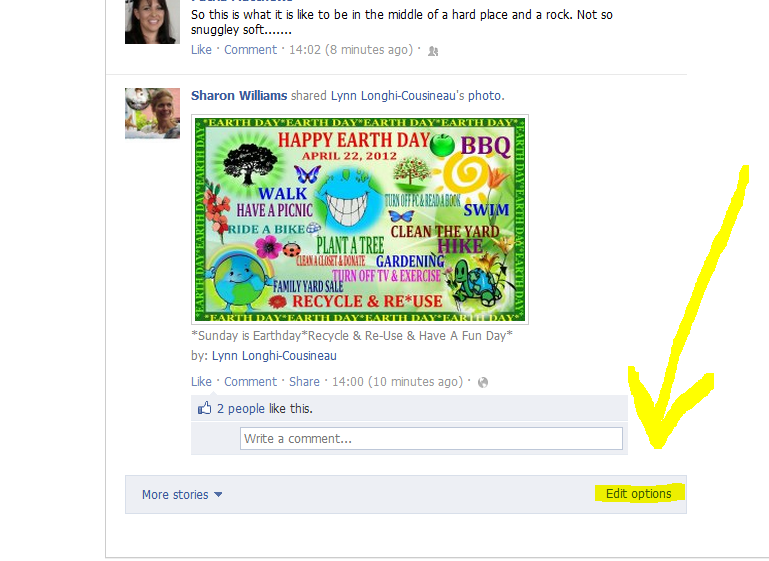
Look down the bottom on the RIGHT you will see EDIT OPTIONS


Click on EDIT OPTIONS and you can then see if you have Bubble Witch Blocked.


Bubble Witch Saga is a free game and puzzle! Along with the rules, we have free coins, videos, tips, tricks and cheats on our All Help Group website. And join our Group on Facebook for interactive support for members!

What is a Green Spider?


When a Bubble bounces on a GREEN spider, the Bubble multiplies. The more Bubbles that fall into your Cauldron the more points you receive.


BLUE Spiders will turn GREEN if you shoot a 3-bubble cluster 5 times (5 x 3+) consecutively. The tips will often tell you to deliberately create these clusters, if you have enough bubbles, so you can create green spiders.


Once a Bubble drops onto a GREEN Spider it will return to BLUE and you will have to do your 5 x 3+ combinations again to return it to GREEN.


YELLOW spiders cannot be turned into GREEN spiders.


GREEN spiders have the highest value; then YELLOW; and BLUE is the least, so try to end your game with GREEN and YELLOW spiders.


TIP FOR THOSE WITHOUT CHARMS:


  • Try to make sure that your 5 x 3+ combinations do NOT drop any surrounding balls. Save that for the Last Shot when you drop the ceiling.


TIP FOR THOSE WITH CHARMS:


  • If you purchased RAINBOW bubbles and you get to the end and have any left over, if you have a blue spider you can shoot the rainbow bubble to deliberately miss and it will become a green spider.
  • You can do the same thing with the Salvation Charm.
  • ...and the Shattering Charm.


  • "DELIBERATLY MISS" MEANS: Shoot the rainbow ball at an infection, at a row of black bubbles or an empty spot on the top. As long as it doesn't hit any normal bubbles it will turn a BLUE spider GREEN. For those who have the "skull" and the "shattering" charm the same rule applies. 
  •  If you get to the end and you have not used them, and you have blue spiders, you can use these charms and deliberately miss and it will turn BLUE Spiders to GREEN. Potentially you can turn two unused “Rainbow Potions”, two unused “Skull Charms” and one “Shattering Charm” into GREEN Spiders, but only if you have all 10 spiders, 5 of which are already BLUE


For a more in-depth look at Green Spiders click below: